 Polytoolhub
What is Polyfox?
Polyfox combines wallet discovery, manual trading and configurable copying in one Telegram interface. Its most useful controls operate at different stages: filter the leader’s original trade, calculate your copy size, then apply your own limits and order settings. A copy can run in a separate sub-wallet to keep its positions and budget isolated from manual trades.
Who it is for
- Telegram traders who want granular copying controls
- Users running several leaders with separate budgets
- Users combining manual orders with automated copying
Features and coverage
- Available on
- Telegram, Web docs
- Markets & venues
- Polymarket
- Research topics
- Copy sizing, Sub-wallet isolation
- Two sizing modes
Copy a percentage of the leader’s trade or a fixed dollar amount.
- Leader-trade filters
Filter the original trade by size and outcome price.
- Your-copy limits
Apply minimum and maximum amounts after sizing.
- Separate order settings
Choose market or limit orders independently for buys and sells, with slippage or offset/expiry controls.
- Sub-wallet isolation
Keep one copy’s balance and positions separate from other strategies.
- Exit controls
Configure take-profit and stop-loss for market-sell mode.
- Balance guards
Pause mirroring when a balance threshold is reached.
- Execution reports
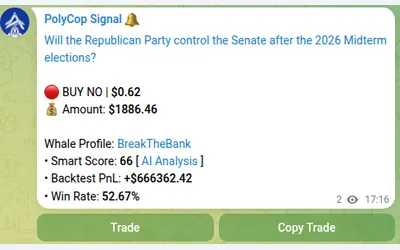
Read filled, failed and skipped copies with target and actual prices.
- Smart Wallets and backtesting
Find candidate leaders and inspect simulated historical copying.
- Exportable wallets
The documented wallet flow includes private-key export.
Workflows with Polyfox
Create an isolated copy
Choose a leader, create a sub-wallet copy, set its budget and sizing, then review the buy and sell settings.
Avoid oversized tiny copies
Review the default setting that raises sub-$1 copies to $1; disable it if those trades should be skipped.
Prevent a copied exit touching manual shares
Use a sub-wallet when manually trading the same outcome, because a main-wallet copy-sell applies to the combined holding.
Stop a strategy cleanly
Pause or delete the copy, then inspect and manage the remaining positions separately.
Pricing and total cost
1% on each manual or copied buy and sell; no subscription.
Fees and usage costs
- Minimum deposit: $10. Minimum trade: $1.
- No Polyfox deposit or withdrawal fee; external bridge fees can reduce a withdrawal’s received amount.
- The suggested $100 copying balance is a sizing recommendation, not a minimum deposit.
Getting started
Before you start: Fast Copy can act on a pending transaction that later reverts; disable it to follow confirmed trades.
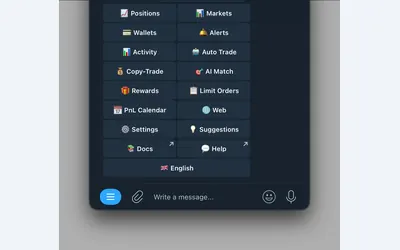
- Open @polyfox and inspect the menu.
- Choose Smart Wallets or paste a public leader address in Create Copy Trade.
- Select fixed or percentage sizing.
- Set target-trade filters and your own per-trade limits.
- Choose an isolated sub-wallet if positions must remain separate.
- Review Fast Copy, order types, exit controls and the $1-floor behavior.
- Fund only after reviewing the configuration.
Useful links
What to check
- Fast Copy can act on a pending transaction that later reverts; disable it to follow confirmed trades.
- Balance guards pause copying but do not close existing positions.
- Deleting a copy does not sell its positions.
- Main-wallet copy-sell affects all shares of that outcome in the main wallet.
- Automatic redemption of resolved winners is documented for the main wallet, not copy sub-wallets.
A closer look
Ratings & reviews
User reviews 0
The main score switches to user ratings after 5 published reviews.
A specific example helps the next person choose the right tool.
Write a review
How was your experience with Polyfox?
Share what you used, what worked and what could be better. We confirm your email and review the submission before publishing.
To submit a review, email info@polytradingbot.com with the tool name, your rating and your experience. Enable JavaScript to prepare a draft here.
Related tools
Browse category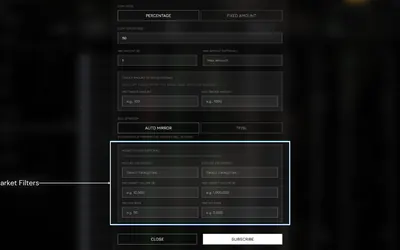

Research wallets and trade through Telegram or the web, with percentage/fixed copying, source-trade filters and distinct copy and Autopilot exit behavior.
- Trading mode Manual · Live automation
- Access Web · Telegram

Manage wallet copying, alerts and automated strategies from Telegram or a connected web terminal.
- Trading mode Manual · Live automation
- Access Web · Telegram

Copy Polymarket wallets in Telegram with market or limit orders, granular exposure limits, order-book pricing and a separate BTC automation mode.
- Trading mode Manual · Live automation
- Access Telegram
Frequently asked questions about Polyfox
What is the official bot?
@polyfox.
Does pausing sell my positions?
No. It stops new mirroring.
Why was a small trade raised to $1?
The platform-floor setting does this by default; your own Min Per Trade instead skips undersized copies.
Can I isolate one leader?
Yes. Use a separately funded sub-wallet.
Are copied trades charged twice?
Copying has the same 1% trade charge as manual orders; there is no extra copying layer.