 Polytoolhub
What is PolyCop?
PolyCop turns a public Polymarket wallet address or profile link into a configurable copy task. You choose how much to copy, how to price the order and when an unfilled order should expire. Its controls distinguish a single outcome, the whole market and the total exposure to a copied trader. Manual trading and AFK automation sit alongside copying. The public signal channel supplies wallet trade examples with market links and shortcuts into the bot.
Who it is for
- Copy traders who need explicit control over entry prices and order lifetime
- Users following several wallets with different size and market filters
- Traders who want separate buy and sell copying switches
- BTC traders configuring time-based automated entries
Features and coverage
- Available on
- Telegram
- Markets & venues
- Polymarket
- Research topics
- Copy trading, Wallet signals, BTC automation
- Fixed or percentage sizing
Enter a dollar amount for a constant trade size or a percentage to scale the target’s trade. Minimum-trade and dust filters determine what happens to very small copies.
- Two limit-pricing methods
Use an offset from the target trader’s price or select an order-book level from Bid L1 through Ask L3, including midpoint. Selecting a book level disables the offset mode.
- Order lifetime
Assign an expiry to copied limit orders. The documented minimum is 90 seconds; without a duration they do not automatically expire.
- Layered exposure limits
Set per-trade, per-outcome, per-market and total-trader limits, plus a maximum number of open markets. The per-outcome calculation includes filled orders, open bot limit orders and the pending trade.
- Buy and sell switches
Pause copied buys while continuing to follow sells, or disable both. Sell execution has its own market/limit setting.
- Entry and exit filters
Set minimum/maximum share prices, ignore target trades below a chosen size and configure stop-loss or take-profit rules.
- AFK BTC strategies
Combine a time window within a 15-minute round, an UP-share price range and a BTC spot-price change condition. Each strategy also has a direction, order price, lifetime, buy amount and number of rounds.
- Telegram signal feed
Public messages show a trade’s direction, price and size with wallet score, backtest PnL, win rate and links to analysis, manual trading and copying.
Workflows with PolyCop
Copy at a controlled price
Paste a wallet address or profile link, choose fixed or proportional sizing, then select either a price offset or a book level. Set order duration and exposure limits before activating the task.
Avoid minimum-size inflation
Compare the calculated copy amount with the bot’s minimum-order behavior. If small trades would be rounded up, combine the setting with a target-trade-size filter and a maximum spend per trade.
Research a signal
Open a public signal, inspect the linked market and wallet, then use its analysis or copy shortcut. A wallet’s score and historical PnL are inputs for comparing traders, separate from the current market price.
Retain sell management while pausing entries
Turn Copy Buy off and leave Copy Sell on. Check the sell mode before relying on the task’s exit settings.
Pricing and total cost
PolyCop charges 0.5% of trading volume. The documentation says the accrued fee is deducted when accumulated volume reaches $600.
Fees and usage costs
- The provider covers gas for redeem actions and does not require a POL balance for its gasless trading workflow.
- Direct Polygon USDC.e deposits have no additional PolyCop deposit charge; cross-chain or swap routes can charge routing fees.
Access: The funding guide specifies a $10 cross-chain bridge minimum and at least $50 to create copy trading.
Getting started
Before you start: Choosing limit-order selling disables copy-task TP/SL. The documented TP/SL combination requires the sell setting to use market orders.
- Open @PolyCop_BOT and use /start.
- Read the displayed deposit and trading addresses carefully; use the address associated with your selected network and token.
- Paste the target’s public wallet address or Polymarket profile link.
- Set fixed amount or copy percentage, then configure minimum handling, dust filters and spending caps.
- Choose market execution with slippage or limit execution with price rules and expiry.
- Review Copy Buy, Copy Sell and exit settings, then activate the task.
- Monitor positions and available balance; use the task switches to pause further entries.
Useful links
What to check
- Choosing limit-order selling disables copy-task TP/SL. The documented TP/SL combination requires the sell setting to use market orders.
- Minimum-order handling can increase the copied amount above the selected percentage. The guide lists $1 for market orders and five shares for limit orders.
- The total-trader limit pauses copying when exposure reaches the cap and allows it to resume after selling or claiming releases that exposure.
- AFK strategies have their own configuration and a documented $5 minimum per trade; their settings are separate from wallet-copy tasks.
A closer look
Ratings & reviews
User reviews 0
The main score switches to user ratings after 5 published reviews.
A specific example helps the next person choose the right tool.
Write a review
How was your experience with PolyCop?
Share what you used, what worked and what could be better. We confirm your email and review the submission before publishing.
To submit a review, email info@polytradingbot.com with the tool name, your rating and your experience. Enable JavaScript to prepare a draft here.
Related tools
Browse category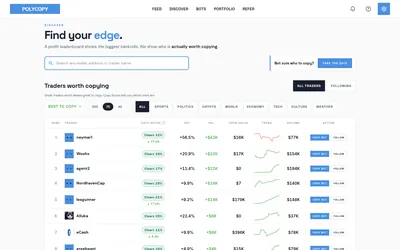

Find traders worth researching, try paper copying, or run a copy bot with your own rules and budget.
- Trading mode Paper · Manual · Live automation
- Access Web
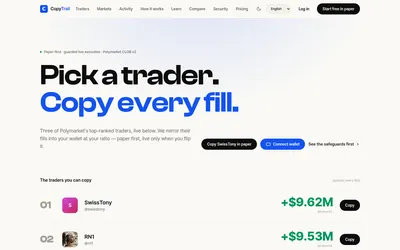

Test a wallet-copy strategy on paper, inspect the fills, then set live budgets and slippage limits.
- Trading mode Paper · Live automation
- Access Web
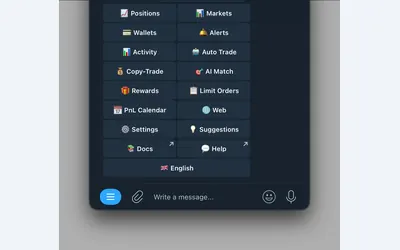

Manage wallet copying, alerts and automated strategies from Telegram or a connected web terminal.
- Trading mode Manual · Live automation
- Access Web · Telegram
Frequently asked questions about PolyCop
Is PolyCop the same as Polycopy.app?
No. This card covers the Telegram bot @PolyCop_BOT and its linked documentation.
Can I copy using limit orders?
Yes. Choose a target-price offset or an order-book level, then optionally set an expiry.
Can I stop new buys but continue copying exits?
Yes. Copy Buy and Copy Sell have independent switches.
Why did a tiny trade use more than my percentage?
The below-minimum setting can round a calculated copy up to the minimum trade size. Check that option alongside the dust filter.