 Polytoolhub
What is CopyTrail?
CopyTrail follows a selected trader’s fills and sizes a corresponding order at your chosen ratio. New accounts begin in paper mode, where the activity log can be compared with the trader’s public record. Live copying requires a separate key-registration step and an explicit live switch. Daily and monthly budgets, minimum source-trade filters and a pause control govern subsequent entries.
Who it is for
- Users who want to observe copied fills before trading live
- Copy traders setting proportional sizing and explicit budgets
- Users comparing source activity with a recorded copy history
Features and coverage
- Available on
- Web
- Markets & venues
- Polymarket
- Research topics
- Copy trading, Paper trading
- Paper mode
Log mirrored fills without moving real funds, using the same selected trader and sizing configuration.
- Ratio-based sizing
Translate a source trade into your chosen fraction; the public calculator illustrates the order size.
- Budget controls
Set daily and monthly caps and review the separate standing seed-cap limit of your plan.
- Execution checks
Balance, source-trade minimum and slippage checks can prevent an attempted copy.
- Explicit live switch
Live execution is a separate state after registration of a trading key.
- Activity history
Compare recorded source fills, copied trades and the dashboard history.
- Global pause
Stop new copying while retaining the positions already held.
Workflows with CopyTrail
Compare source and paper fills
Create an account, choose a trader, set the ratio and budgets, then compare paper entries with the trader’s public fills. Inspect missed or differently sized entries before changing modes.
Bound a live strategy
Check the standing capital cap, daily/monthly limits and slippage together. Enable live mode only for the selected configuration.
Pause further exposure
Use the pause control to stop new copies, then manage existing positions separately.
Pricing and total cost
The Free plan includes live copying up to a $3,000 seed cap and one tracked trader. Paid plans raise the standing capital cap; live trades also incur a builder fee.
Free
$0
- $3,000 seed cap
- One trader
- Paper mode and history
Starter
See checkout
- $5,000 seed cap
- One trader
Pro
See checkout
- $20,000 seed cap
- One trader and priority support
Whale
See checkout
- No seed cap
- Unlimited traders
- Telegram support
Fees and usage costs
- The public plan cards describe a builder fee on traded value but do not specify its rate.
Access: Paid plans use USDC on Polygon.
Getting started
Before you start: Pausing stops new copies; it does not close existing positions.
- Create an account; the initial mode is paper.
- Select a trader and inspect the linked public profile.
- Set copy ratio, minimum source-trade filter, budgets and slippage.
- Review the paper activity against source fills.
- If you choose live copying, complete the documented trading-key setup and review the live switch.
- Monitor the activity log and pause new copies when you want to stop adding exposure.
Useful links
What to check
- Pausing stops new copies; it does not close existing positions.
- A plan’s seed cap is a standing limit that releases capacity as positions close, distinct from a monthly spending budget.
- The public calculator multiplies the trader’s historical result by a ratio; it does not simulate every historical fill, available balance or execution cost.
A closer look
Ratings & reviews
User reviews 0
The main score switches to user ratings after 5 published reviews.
A specific example helps the next person choose the right tool.
Write a review
How was your experience with CopyTrail?
Share what you used, what worked and what could be better. We confirm your email and review the submission before publishing.
To submit a review, email info@polytradingbot.com with the tool name, your rating and your experience. Enable JavaScript to prepare a draft here.
Related tools
Browse category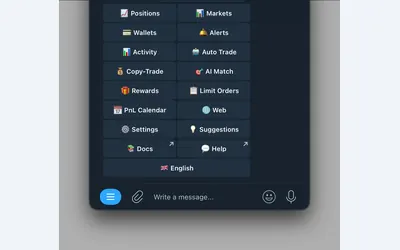

Manage wallet copying, alerts and automated strategies from Telegram or a connected web terminal.
- Trading mode Manual · Live automation
- Access Web · Telegram
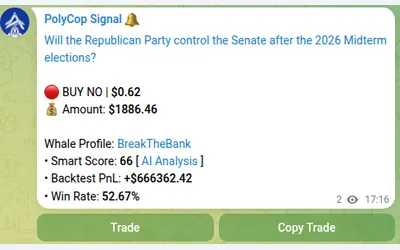

Copy Polymarket wallets in Telegram with market or limit orders, granular exposure limits, order-book pricing and a separate BTC automation mode.
- Trading mode Manual · Live automation
- Access Telegram
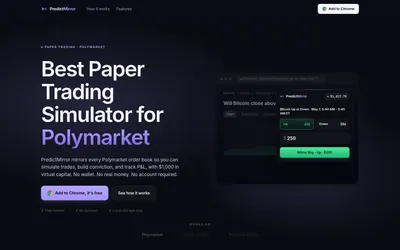

Practice Polymarket in a browser panel with live prices, a virtual bankroll and local trade history.
- Trading mode Paper
- Access Browser extension
Frequently asked questions about CopyTrail
Does the Free plan include live trading?
Yes, within its standing seed cap and one-trader limit.
Do new accounts immediately trade real money?
No. They begin in paper mode; live copying requires its separate setup and switch.
Does pausing sell everything?
No. It stops new copies and leaves existing positions in place.
Does a higher plan change the strategy?
The public plan comparison primarily raises capital and trader limits; the copying workflow remains ratio-based.