 Polytoolhub
What is Olympus?
Olympus is a trading terminal with a server-side copy engine. Its main configuration work is deciding how much to copy, which leader trades qualify and how positions should exit. Historical simulation helps compare those settings before enabling a leader, while the live engine runs independently of the browser.
Who it is for
- Users who need per-leader sizing and trade filters
- Traders combining manual and copied positions
- Users comparing a leader under different execution assumptions
Features and coverage
- Available on
- Web
- Markets & venues
- Polymarket
- Proportional copying
Set a ratio per leader and use the ratio recalculator as a sizing aid.
- Exposure caps
Limit individual trade size, total market size, open markets and repeated entries.
- Execution filters
Filter by liquidity, volume and maximum price deviation.
- Limit-buy mode
Target the leader’s execution price instead of immediately taking the current ask.
- Exit controls
Configure stop-loss and take-profit rules globally, per leader or for supported manual positions.
- Copy simulations
Compare fixed-balance or unlimited-capital runs, skipped trades and modeled execution costs.
- Server-side operation
Keep copying active while the browser is closed.
- Trade management
Combine manual orders, copying and supported split/merge or reverse-copy settings.
Workflows with Olympus
Configure one leader
Review the wallet, set a ratio and market cap, choose execution filters and inspect the resulting backtest. Enable the live configuration only after its behavior matches the intended allocation.
Compare execution settings
Change price-deviation and limit-buy settings, then inspect skipped trades and slippage sensitivity rather than only total P&L.
Manage exits
Set the relevant position-level or leader-level exit rule, inspect its scope and monitor any failed-exit cooldown.
Pricing and total cost
A 0.75% fee applies to eligible executed dollar volume, including buys, sells and certain claims or redemptions. Idle balances and canceled unfilled orders are excluded. Account discounts and the applicable rate appear in Settings → Fees; venue fees can apply separately.
Getting started
Before you start: Closing the browser does not pause server-side copying.
- Sign in through the supported Discord or Google flow.
- Inspect the Olympus trading wallet created through Privy.
- Follow the current pUSD funding instructions for that wallet.
- Review the bot’s initial ON state before funding and adding leaders.
- Set per-leader ratio, market caps and price-deviation limits.
- Run a bounded copy simulation and inspect skipped trades.
- Confirm whether the bot should be active after setup.
Useful links
What to check
- Closing the browser does not pause server-side copying.
- The documented signup creates an Olympus trading wallet; it does not directly trade from an arbitrary existing external wallet.
- A limit buy can remain unfilled, and a crossing limit can still execute as a taker.
- Historical copy simulations use a trade-tape model rather than full queue reconstruction.
- Some live stop-loss and take-profit settings are not simulated in backtests.
- Supported triggered exits sell the whole position rather than a partial slice; failed exits can enter a cooldown.
A closer look
Ratings & reviews
User reviews 0
The main score switches to user ratings after 5 published reviews.
A specific example helps the next person choose the right tool.
Write a review
How was your experience with Olympus?
Share what you used, what worked and what could be better. We confirm your email and review the submission before publishing.
To submit a review, email info@polytradingbot.com with the tool name, your rating and your experience. Enable JavaScript to prepare a draft here.
Related tools
Browse category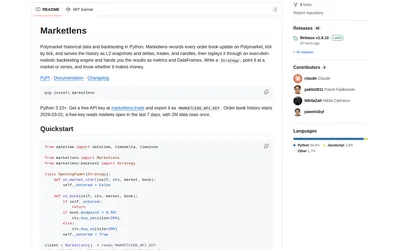

Retrieve historical Polymarket books and run either tick-level execution simulations or faster bar-based signal backtests in Python.
- Language Python
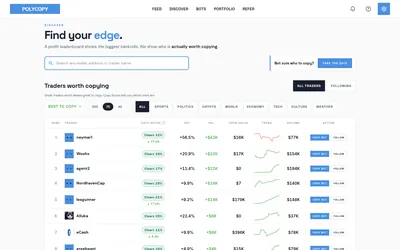

Find traders worth researching, try paper copying, or run a copy bot with your own rules and budget.
- Trading mode Paper · Manual · Live automation
- Access Web
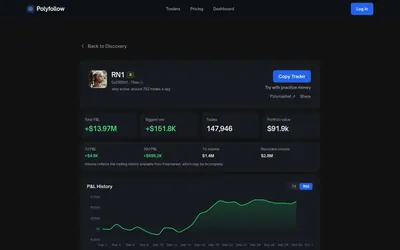

Find Polymarket traders and copy selected wallets automatically, with no Polyfollow subscription or service trading fee.
- Trading mode Live automation
- Access Web
Frequently asked questions about Olympus
Does copying stop when I close the tab?
No. Use the bot controls to pause the server-side engine.
Why did a leader trade get skipped?
Inspect price deviation, liquidity, size limits, exposure caps and the run’s skipped-trade breakdown.
Does Limit Buy Mode always make a maker order?
No. If the limit crosses the current ask it can fill immediately as a taker.
Can I compare a fixed bankroll with an unlimited simulation directly?
They answer different questions; use the same capital model when comparing settings.
Where can I confirm my fee?
Settings → Fees shows the account’s applicable rate and discounts.