 Polytoolhub
What is Share?
Share is a mobile interface built around the existing Polymarket account. The provider says funds and attributed trading volume remain on that account. Social profiles connect positions, transactions and wallet-following notifications, while the leaderboard supports discovering traders to follow or copy.
Who it is for
- Users wanting a mobile Polymarket interface
- Traders following public-wallet moves
- Users combining social discovery with position management
Features and coverage
- Available on
- iOS
- Markets & venues
- Polymarket
- Research topics
- Mobile portfolio, Wallet following
- Polymarket sign-in
Connect the existing venue account.
- Mobile market access
Browse the venue’s event categories and trade from the app.
- Live charts
Follow market price changes.
- Holder context
Inspect current market participants.
- Portfolio management
View the value of open positions.
- Wallet profiles
Research positions and transactions through public profiles.
- Trade notifications
Follow an on-chain wallet and receive activity updates.
- Social identity
The provider describes ENS naming and Farcaster follow imports.
- Copy discovery
Use the leaderboard to find traders and copy workflows.
Workflows with Share
Move an existing workflow to mobile
Install the official app, connect Polymarket and check that the displayed account and positions match.
Follow a trader
Open a wallet profile, inspect its positions and enable notifications.
Review a copied position
Check the source idea, the actual account exposure and the order details before acting.
Pricing and total cost
An iOS download is offered. The reviewed page does not publish a complete user trading-fee schedule; use the in-app quote and terms. The advertised trader revenue share is separate from what the follower pays.
Getting started
Before you start: The public page explicitly offers iOS; other platform availability should be checked through official downloads.
- Follow the official download link.
- Connect your Polymarket account.
- Confirm account identity and positions.
- Choose wallets to follow.
- Configure notifications and inspect any copy-order settings.
Useful links
What to check
- The public page explicitly offers iOS; other platform availability should be checked through official downloads.
- A leader revenue-share percentage is not a user fee quote.
- Wallet notifications and automatic copying are different actions.
A closer look
Ratings & reviews
User reviews 0
The main score switches to user ratings after 5 published reviews.
A specific example helps the next person choose the right tool.
Write a review
How was your experience with Share?
Share what you used, what worked and what could be better. We confirm your email and review the submission before publishing.
To submit a review, email info@polytradingbot.com with the tool name, your rating and your experience. Enable JavaScript to prepare a draft here.
Related tools
Browse category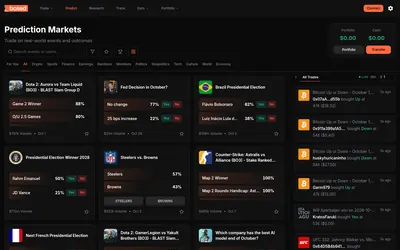
Trade Polymarket from a combined web and mobile app, with list, card and calendar discovery plus public trader analysis.
- Trading mode Manual
- Access Web · iOS · Android


Discover traders and copy their positions from a mobile app, with an allocation budget, direct or inverse copying and portfolio controls.
- Access iOS · Android

Create prediction games with friends using virtual Cred, private groups and imported Polymarket odds for comparison.
- Access iOS · iPadOS
Frequently asked questions about Share
Where do funds stay?
The provider says they remain on the Polymarket account.
Can I follow a public wallet?
Yes.
Does it show positions?
Yes, through portfolio and profile views.