 Polytoolhub
What is Coinpilot?
Coinpilot Pro combines trader discovery with copy execution across prediction markets and perpetuals. You choose a trader, allocate part of your balance and review the copying direction and advanced settings before starting. The Pro experience is the relevant one for Polymarket. Coinpilot Lite uses the same login but focuses on memecoins and keeps a separate wallet, balance and positions.
Who it is for
- Users who want a mobile copy-trading workflow
- Traders allocating distinct budgets to copied strategies
- Users comparing a trader’s history before enabling automation
Features and coverage
- Available on
- iOS, Android
- Markets & venues
- Polymarket, Hyperliquid
- Research topics
- Mobile copying, Trader discovery
- Trader discovery
Browse traders ranked using performance data and the product’s AI-assisted selection.
- Performance analysis
Review track records, historical metrics and current activity before assigning a budget.
- Direct or inverse copying
Choose whether the copy follows or reverses the selected trader’s direction where the account flow offers it.
- Allocation controls
Set a specific amount or use a balance percentage before starting a copy.
- Advanced copy settings
Review sizing and risk controls within the chosen market’s copy flow.
- Portfolio monitoring
Track copied traders and open positions together.
- Mobile access
Use the iOS or Android app for discovery, setup and monitoring.
- Separate Pro and Lite modes
Keep prediction-market and perpetual workflows in Pro; Lite is the memecoin product.
Workflows with Coinpilot
Start a Polymarket copy
Enter Pro, find a prediction-market trader, inspect the history and choose an allocation. Review direction and advanced controls, then inspect the first executed copy.
Compare two traders
Use both performance and position behavior before splitting an allocation between them; avoid comparing only their largest profit figure.
Move between product modes
Check whether you are in Pro or Lite before depositing. Switching modes does not transfer balances or alter existing positions.
Pricing and total cost
Polymarket copy trading carries a 1% Coinpilot platform fee per successfully executed copied trade.
Fees and usage costs
- Polymarket: 1% platform fee per executed copied trade, with venue fees separate.
- Hyperliquid: a separate 0.05% Coinpilot trade fee, venue fee and $1 fresh-wallet activation charge are documented.
Access: Lite has its own fee schedule; it is not the Polymarket pricing model.
Getting started
Before you start: Pro and Lite share a login but have separate wallets, balances and positions.
- Install Coinpilot using an official app-store link.
- Create an account and choose Pro.
- Select the prediction-market trader-discovery area.
- Inspect the trader and allocate the intended amount.
- Review direction, sizing, limits and fees before starting.
- Monitor copied positions in the Pro portfolio.
Useful links
What to check
- Pro and Lite share a login but have separate wallets, balances and positions.
- The 1% Polymarket charge applies per executed copied trade, rather than only to net profit.
- A control shown for one supported venue may differ in the other venue’s copy flow.
A closer look
Ratings & reviews
User reviews 0
The main score switches to user ratings after 5 published reviews.
A specific example helps the next person choose the right tool.
Write a review
How was your experience with Coinpilot?
Share what you used, what worked and what could be better. We confirm your email and review the submission before publishing.
To submit a review, email info@polytradingbot.com with the tool name, your rating and your experience. Enable JavaScript to prepare a draft here.
Related tools
Browse category

Test a wallet-copy strategy on paper, inspect the fills, then set live budgets and slippage limits.
- Trading mode Paper · Live automation
- Access Web
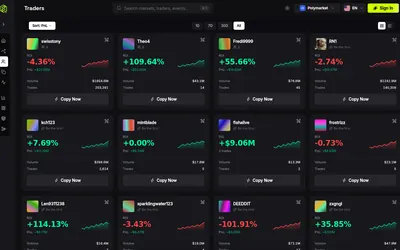

Discover public traders and copy their entries and exits through a web terminal or Telegram, with stake sizing, caps and slippage controls.
- Access Web · Telegram
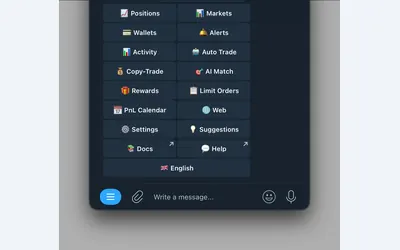

Manage wallet copying, alerts and automated strategies from Telegram or a connected web terminal.
- Trading mode Manual · Live automation
- Access Web · Telegram
Frequently asked questions about Coinpilot
Which version supports Polymarket?
Coinpilot Pro.
Does switching from Lite move my funds?
No. The documentation says balances and positions remain separate.
What does Polymarket copying cost?
Coinpilot charges a 1% platform fee per executed copied trade; venue fees are separate.
Can I set an allocation instead of using my whole balance?
Yes. The copy flow includes a chosen allocation amount and balance-percentage shortcuts.