 Polytoolhub
What is PolymarketOddsConverter (extension)?
Polymarket Odds Converter is a small browser extension for users who think in decimal odds. It changes the presentation of probabilities on Polymarket pages, so a price such as 50% can be read as approximately 2.00 decimal odds. It does not change the contract, payout mechanics or order book.
Who it is for
- Users accustomed to sportsbook decimal odds
- People comparing probability and odds displays
- Technical users comfortable loading an unpacked extension
Features and coverage
- Available on
- Chrome, Firefox
- Markets & venues
- Polymarket
- Decimal display
Convert visible implied probabilities into decimal odds.
- Toolbar toggle
Switch the conversion on or off without removing the extension.
- Chrome support
Use the Chrome-specific manifest and service-worker background implementation.
- Firefox support
Use the Firefox manifest and background-script implementation.
- Local installation
Load the repository directly instead of requiring a hosted account.
Workflows with PolymarketOddsConverter (extension)
Read a market in familiar units
Install the correct browser build, open a Polymarket page and toggle between probability and decimal display.
Compare two formats
Use the toggle to confirm which displayed number belongs to which representation, while keeping the original contract rules in view.
Pricing and total cost
The repository lists no subscription or paid unlock. Installation is manual through the browser’s extension developer tools.
Getting started
Before you start: Chrome and Firefox require different manifest files.
- Download the repository.
- Rename the browser-specific manifest to manifest.json in the chosen copy.
- For Chrome, enable Developer mode and load the unpacked directory.
- For Firefox, load it as a temporary add-on through the debugging page.
- Open Polymarket and verify the toolbar toggle.
Useful links
What to check
- Chrome and Firefox require different manifest files.
- The documented Firefox path installs a temporary add-on.
- Decimal odds change presentation only; fees and liquidity still affect trade economics.
- Page-layout changes on Polymarket can affect an extension that rewrites displayed values.
A closer look
Ratings & reviews
User reviews 0
The main score switches to user ratings after 5 published reviews.
A specific example helps the next person choose the right tool.
Write a review
How was your experience with PolymarketOddsConverter (extension)?
Share what you used, what worked and what could be better. We confirm your email and review the submission before publishing.
To submit a review, email info@polytradingbot.com with the tool name, your rating and your experience. Enable JavaScript to prepare a draft here.
Related tools
Browse category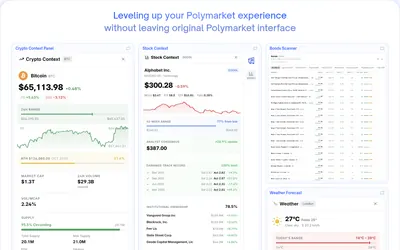

Bring charts, news, holder analytics and comment filters directly into Polymarket.
- Access Browser extension
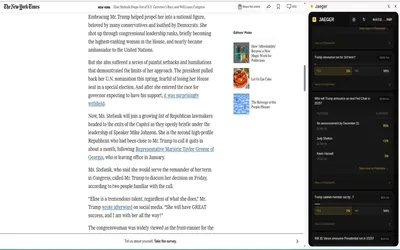

Find Polymarket markets related to the page or highlighted text you are reading, including a dedicated Twitter/X integration.
- Access Browser extension
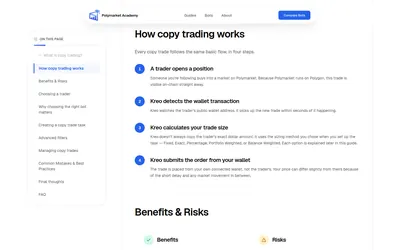

Read independent beginner guides to Polymarket copy trading, wallet selection and bot comparisons.
- Access Web
Frequently asked questions about PolymarketOddsConverter (extension)
Does this alter an order price?
It changes the display format, not the underlying contract or order book.
How are probability and decimal odds related?
For a simple gross decimal representation, divide one by the probability expressed as a fraction.
Can I turn it off quickly?
Use the extension’s toolbar icon.
Is there one manifest for both browsers?
The repository supplies separate Chrome and Firefox manifests.