 Polytoolhub
What is Merlin?
Merlin presents public traders as research profiles, with category specialties, recent activity, PnL and weekly-return information. The website provides the browsing and comparison layer; its action buttons hand off to the Telegram bot. Use the profiles to shortlist traders and inspect their concentration and recent record before following a wallet.
Who it is for
- Users discovering traders within sports, politics or crypto
- Researchers comparing recent performance with lifetime PnL
- Telegram users who want a wallet-research entry point
Features and coverage
- Available on
- Web, Telegram
- Markets & venues
- Polymarket
- Research topics
- Trader discovery, Category specialists
- Trader leaderboard
Browse public wallets with performance and activity figures.
- Category specialties
Identify sports, politics, crypto, finance and other trader focuses.
- Recent-return context
Compare weekly return with displayed total PnL.
- Activity indicator
Check recent volume to distinguish active and inactive profiles.
- Strategy summaries
Read concise descriptions of concentration and trading style.
- Telegram handoff
Open the official bot from a trader research page.
- Market browsing
Explore markets alongside the trader and insider sections.
- Telegram copy trading
Move from a ranked trader profile to the official Telegram bot’s copy-trading flow.
Workflows with Merlin
Find a category specialist
Browse the leaderboard, choose the relevant specialty and inspect the trader’s recent activity.
Check concentration
Compare the strategy description with the number and type of markets traded before using the Telegram handoff.
Follow a research lead
Open the wallet profile, note its current figures and continue in the bot for the supported follow workflow.
Research before copying
Compare a trader’s category focus and recent activity, then use the Copy Trade in Telegram action to review the bot’s copying setup.
Pricing and total cost
Public trader pages can be browsed on the website. A complete bot fee or subscription schedule is not displayed there; inspect the bot’s terms before activating paid features.
Getting started
Before you start: The website is an analytics surface and says it does not execute trades.
- Open the trader research website.
- Choose a profile in your market category.
- Compare total PnL, weekly return and recent volume.
- Open the official Merlin bot using the direct Telegram link.
- Review the bot’s available actions and costs before configuring a follow.
Useful links
What to check
- The website is an analytics surface and says it does not execute trades.
- A strategy label is a research description, not proof of who owns a wallet.
- Large lifetime PnL can coexist with negative recent returns.
- Displayed minimums vary by profile and should be checked in the bot.
A closer look
Ratings & reviews
User reviews 0
The main score switches to user ratings after 5 published reviews.
A specific example helps the next person choose the right tool.
Write a review
How was your experience with Merlin?
Share what you used, what worked and what could be better. We confirm your email and review the submission before publishing.
To submit a review, email info@polytradingbot.com with the tool name, your rating and your experience. Enable JavaScript to prepare a draft here.
Related tools
Browse category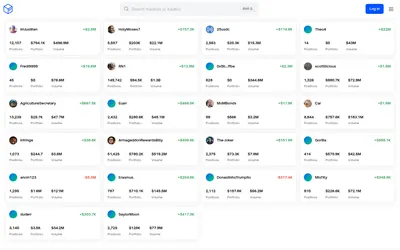

See a trader’s positions and P&L, compare portfolios and export a yearly wallet report.
- Access Web

Compare Polymarket sports prices with profitable-wallet positions, inspect trader grades and track large trades through a dashboard or API.
- Access Web · API · MCP
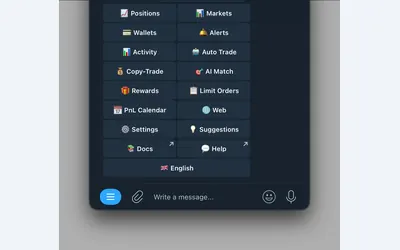

Manage wallet copying, alerts and automated strategies from Telegram or a connected web terminal.
- Trading mode Manual · Live automation
- Access Web · Telegram
Frequently asked questions about Merlin
Can I place an order on the website?
The site describes itself as analytics; action buttons lead to Telegram.
Can I compare different specialties?
Yes. Profiles include market-category and style tags.
Does the page show recent activity?
It includes recent volume and weekly-return information.
What is the official bot link?
Use t.me/merlin0_bot.