 Polytoolhub
What is ElonTracker?
ElonTracker, also branded ElonTweet, groups post-count prediction markets and activity analytics. The analytics page tracks several public accounts and separates observed totals from projected final counts. Hourly patterns, moving averages and weekday comparisons help investigate a counting window. The service also provides market and calculator views, plus the linked Polymarket Elon Tracker Telegram bot.
Who it is for
- Users researching post-count brackets
- Traders comparing current activity with historical posting patterns
- Users who want the tracker’s web analytics and Telegram entry point together
Features and coverage
- Available on
- Web, Telegram
- Markets & venues
- Polymarket
- Research topics
- Tweet counts, Posting patterns
- Persona selection
Choose among supported public accounts, including Elon Musk, Donald Trump and Andrew Tate.
- Observed activity
Inspect period totals, daily average, last-post time and peak hour.
- Time-zone controls
Switch the analytics view between UTC, ET and local time where offered.
- Hourly heatmap
Compare posting intensity across hours and days over selected windows.
- Historical views
Use daily counts, moving averages and weekday or weekend comparisons.
- Projected final count
Compare pace-based estimates for the active market windows.
- Multi-range calculator
Explore the product’s EV and multi-bracket workflow before choosing market outcomes.
- Market and Telegram access
Continue into the market interface or use the official linked bot.
Workflows with ElonTracker
Evaluate a counting window
Select the public account, choose the matching period and time zone, then compare observed total, elapsed time and projected finish with the market’s brackets.
Investigate an activity change
Use the hourly heatmap and moving averages to see whether the current burst differs from the recent pattern.
Compare several brackets
Use the calculator with the exact market window, inspect each selected outcome and review the combined amount before entering orders.
Pricing and total cost
The tweet-market product describes free access supported by voluntary tips. Execution costs, if you trade, should be reviewed in the market or bot order flow.
Getting started
Before you start: The analytics page says its xTracker activity includes posts, replies and quotes, which can exceed a public profile’s Posts tab.
- Open the tweet-market home or its linked Telegram bot.
- Choose the tracked account and the relevant market period.
- Set the time-zone view to match your research.
- Inspect observed counts before consulting projections.
- Use the market rules to check which post types qualify.
- Connect a wallet only for the product’s order-entry flow.
Useful links
What to check
- The analytics page says its xTracker activity includes posts, replies and quotes, which can exceed a public profile’s Posts tab.
- Projected totals and observed counts are separate measures.
- The root domain can open the separate ElonBroker product; the direct /home and /analytics links lead to the tweet-market tool.
- Supported accounts vary by view; use the actual selector rather than assuming every persona has every feature.
A closer look
Ratings & reviews
User reviews 0
The main score switches to user ratings after 5 published reviews.
A specific example helps the next person choose the right tool.
Write a review
How was your experience with ElonTracker?
Share what you used, what worked and what could be better. We confirm your email and review the submission before publishing.
To submit a review, email info@polytradingbot.com with the tool name, your rating and your experience. Enable JavaScript to prepare a draft here.
Related tools
Browse category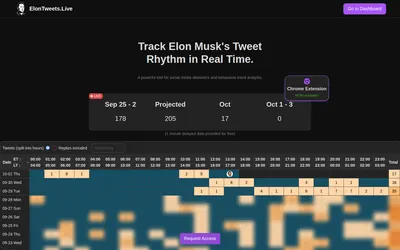
Track Elon Musk’s posting rhythm with hourly counts, heatmaps, projected totals, a browser sidebar and Telegram notifications.
- Access Web · Telegram · Browser extension


Compare Polymarket and Kalshi prices in a sports screener and a market-pulse view for equities, crypto and macro events.
- Trading mode Read-only
- Access Web
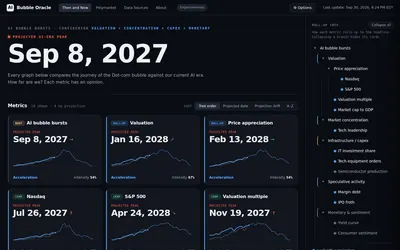
Explore an explicit dot-com/AI-boom analogy, inspect the contributing metrics and see how assumptions change the projected timeline.
- Access Web
Frequently asked questions about ElonTracker
Is the Telegram bot a separate tool?
The official site links polymarketbetbot; it is included here as another surface of the same service.
Why is the count different from X’s Posts tab?
The analytics can include replies and quotes from its xTracker input.
Can I switch time zones?
The analytics page exposes UTC, ET and local-time controls.
Is the projection the observed final count?
No. It estimates a finish from the available activity; the observed count and market rules remain separate.