 Polytoolhub
What is Polymarket BTC 15m Assistant?
This Node.js console assistant follows the selected BTC Up or Down round and shows its outcome prices and liquidity beside external BTC prices. It combines a legacy Polymarket reference-price stream, on-chain Chainlink fallback and Binance spot context with several short-term technical indicators.
Who it is for
- Technical users monitoring BTC 15-minute markets
- Users who prefer a terminal display
- Developers studying a compact multi-feed monitoring application
Features and coverage
- Available on
- Node.js, CLI
- Markets & venues
- Polymarket
- Research topics
- Crypto
- Round selection
Automatically select the latest 15-minute market or pin a specific slug.
- Outcome view
Display UP/DOWN prices and liquidity.
- Reference price
Read the configured Polymarket feed and Chainlink fallback.
- Spot comparison
Show Binance BTC price as a separate reference.
- Technical indicators
Inspect Heiken Ashi, RSI, MACD, VWAP and short-term delta.
- Directional score
Display the assistant’s LONG/SHORT percentage derived from its indicator scoring.
- Configurable RPC
Set HTTP and WebSocket Polygon providers for fallback reads.
Workflows with Polymarket BTC 15m Assistant
Monitor the current round
Start the console, confirm the selected market and compare the contract’s price-to-beat context with current reference and spot prices.
Inspect one round
Pin its slug rather than following the automatic rollover, then watch how the indicators and outcome quotes change.
Repair a stale reference feed
Inspect which source is active and update the legacy stream integration using the official migration guide.
Pricing and total cost
The public repository lists no software subscription. Optional RPC services and the machine running the console can add costs.
Getting started
Before you start: The default WebSocket URL and topic assumptions use the legacy RTDS path; current reference-price migration requires more than changing a URL.
- Use Node.js 18 or newer.
- Install the repository dependencies.
- Choose automatic round selection or a fixed slug.
- Configure a working Polygon RPC fallback.
- Check the legacy RTDS integration against the current official migration guide.
- Start the console and verify the market and active price source.
Useful links
What to check
- The default WebSocket URL and topic assumptions use the legacy RTDS path; current reference-price migration requires more than changing a URL.
- The displayed LONG/SHORT percentage is an indicator-derived score, not a measured win rate.
- Binance spot, Chainlink and the contract’s settlement reference can differ.
- Environment settings in a terminal session are not automatically permanent.
- The README describes monitoring rather than an automated order-execution workflow.
A closer look
Ratings & reviews
User reviews 0
The main score switches to user ratings after 5 published reviews.
A specific example helps the next person choose the right tool.
Write a review
How was your experience with Polymarket BTC 15m Assistant?
Share what you used, what worked and what could be better. We confirm your email and review the submission before publishing.
To submit a review, email info@polytradingbot.com with the tool name, your rating and your experience. Enable JavaScript to prepare a draft here.
Related tools
Browse category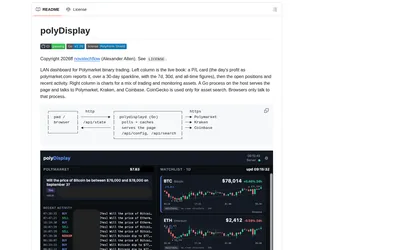
Run a local browser dashboard showing a public Polymarket wallet’s positions, activity and P&L beside crypto price charts.
- Access Web · iPadOS · Android
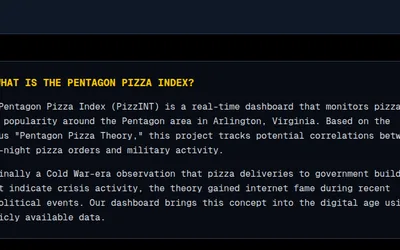

Monitor pizza-shop activity near the Pentagon alongside an OSINT feed, historical activity and prediction-market context.
- Access Web
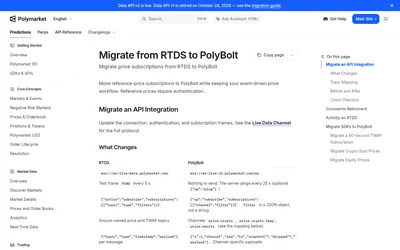

Follow Polymarket real-time activity and migrate legacy reference-price subscriptions to the current PolyBolt stream.
- Data coverage Reference prices · Comments · Trade activity
- Access API
Frequently asked questions about Polymarket BTC 15m Assistant
Does the percentage represent the market price?
No. The assistant’s directional score is derived from its technical indicators.
Can I keep a specific round selected?
Set the explicit market slug.
Does it trade automatically?
The documented workflow is a console monitor.
Why can the BTC prices differ?
They come from distinct sources and update schedules.